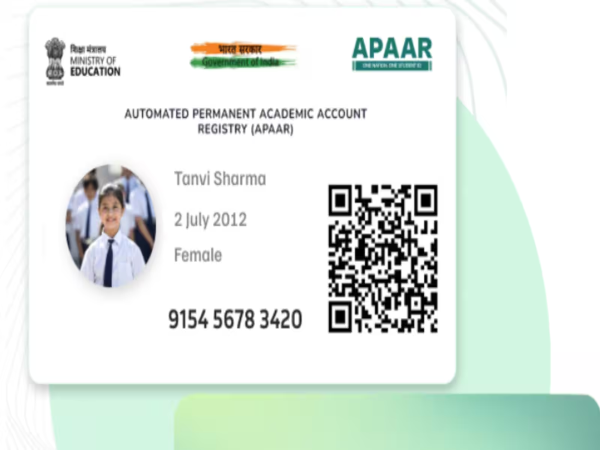
The Uttar Pradesh Madhyamik Shiksha Parishad (UPMSP) has issued important instructions to schools regarding the creation of APAAR IDs for students in classes 9 through 12. The board aims to have APAAR IDs generated and recorded for the maximum number of students before the registration deadline. However, the board registration or examination application of students who do not yet have an APAAR ID will not be withheld. The APAAR ID helps securely maintain students' educational records digitally. It is a unique ID that can be used for future studies, documentation, and scholarship-related processes.
What is an APAAR ID and how does it work?
APAAR stands for Automated Permanent Academic Account Registry. It is a unique 12-digit ID assigned to students, serving as a digital academic identity. This ID remains valid even if a student changes schools, colleges, or states.
Through the APAAR ID, a student's academic records can be digitally consolidated in one place. It facilitates the secure storage of marksheets, transfer certificates (TC), and other essential certificates on digital platforms like DigiLocker, making documents easily accessible when needed.
Assistance with admissions and scholarships
The APAAR ID can be used to easily view and verify academic records during admissions for further studies. This digital identity is also useful for scholarship applications. Additionally, students can digitally store certificates related to sports and other extracurricular activities alongside their academic records.
Parental consent required for creating an APAAR ID
Parental or guardian consent is mandatory to generate an APAAR ID for minor students. School administrations have been instructed to coordinate with parents to complete this process. Information such as the student's name, date of birth, gender, parents' names, mobile number, and Aadhaar details may be required.
Students can also generate an APAAR ID via DigiLocker. To do this, one must log in to DigiLocker and look for the 'APAAR ID' option under the 'Search Documents' section. An ID can be generated after entering the required details and verifying via OTP. Alternatively, to have it created through the school, a consent process must be completed; the school will then enter the necessary information on the UDISE+ portal and complete the verification process. Please note that students will not be denied UP Board registration or examination applications simply because they do not currently possess an APAAR ID.
Disclaimer: This content has been sourced and edited from TV9. While we have made modifications for clarity and presentation, the original content belongs to its respective authors and website. We do not claim ownership of the content.
Contact to : xlf550402@gmail.com
Copyright © boyuanhulian 2020 - 2023. All Right Reserved.